4. Equilibrium
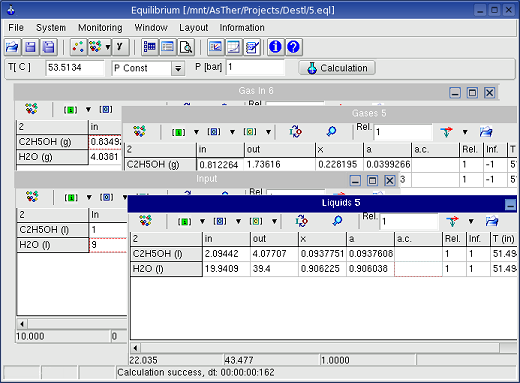
The application calculates the thermodynamic equilibrium at the
given
temperature and pressure or volume for isothermal or adiabatic
conditions.
By variation of the system conditions e.g. temperature, pressure and
mass of substances, the results of several calculations
can be shown as table and graphic in depend of the variant parameters.
The number of phases can be up to 8 (2 gas, 3 liquid and 3 solid). The
maximum number of substances each phase is 255 (allowing 2040
substances
in total).
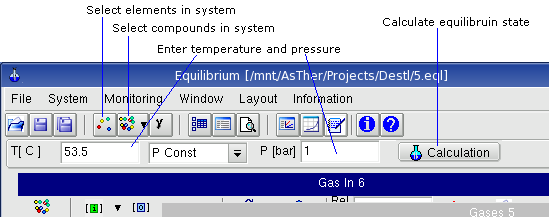
Menu File
File -> Close deselects defined system (elements and
compounds)
File -> Exit: closes the application.
Menu System
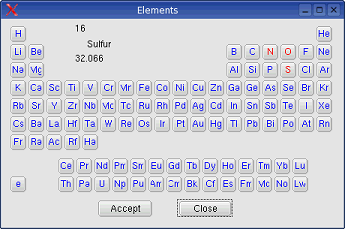
System -> Elements shows the following dialog box, in which the
elements of the system can be selected. When the buttons for the elements are
pressed, the colours will be changed to red or blue. The buttons of the
selected elements are shown in red text.
When electron is selected, ions can be involved for the calculation.
System -> New phase:
As default three phases are given from
the start (gas, liquid and solid).
System -> New phase -> Gas: An additions gas phase will be
created if the number of present phases is less than two.
System -> New phase -> Liquid: An additional liquid phase
will be created if the number of present phases is less than three.
System -> New phase -> Solid: An additional solid phase
will be created if the number of present phases is less than three.
System -> Compounds: When the elements are selected, the substances from these elements can be selected. According to the choice of elements the substances available in the database are displayed in an dialog box.
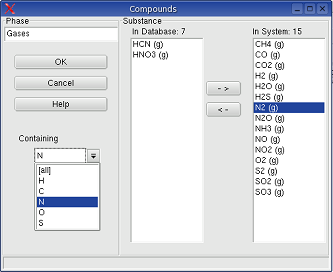
In this dialog box, the title of the phase
windows can be changed. The drop-down-box Containing enables to constrict
the shown substances in the Database-Box
In the picture above, when N is selected in the drop down box, only substances
will be shown in the Database-Box, which contains N, and which is consisting
from C, H, O, N, S: corresponding to the element selection.
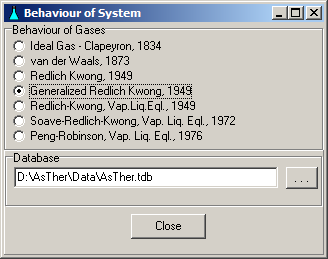
System -> Behaviour: You can select, according to what law the gases should be treated. The state functions can be calculated according to the law of real gases, when the critical data (Tc, Pc) of the gases are known.
System -> Calculation Options: Shows a dialog box for the following settings:
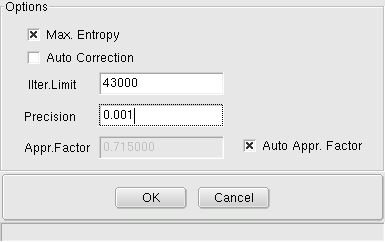
Max. Entropy when it is checked, it is not
necessary to include all substances of the real system, i.e. if the
real system comprises e.g.: Ag (l), H2O (g), H2 (g), O2 (g) H2S (g) and
sulphur solved in silver, the calculation can be executed without Ag(l), if Ag(l)
is not participating in the reaction. It recommended, that Max Entropy
Box should be checked, because all but impossible, that all the really existing
substances to include in a calculation.
Auto correction, when
it is checked,
the application Equilibrium inspects, whether expected pure substances (to be defined as
such by setting the activity-coefficient to (1) can be formed in the
given system. If the formation of such pure substances is impossible,
the calculation will be repeated automatically without considering the
generation of this substance. When
auto correction is
checked, you should always look at the message window, if the
calculation can be carried out without errors.
System-> Environment -> Isotherm / Adiabatic (alternate
menu): When adiabatic is
selected, the temperature will be calculated
and displayed in the input field for the temperature. Your input in
this field will be taken as a starting value for the calculation. After
calculation, this value will be overwritten by the calculation result.
System-> Calculation: carries out a calculation.
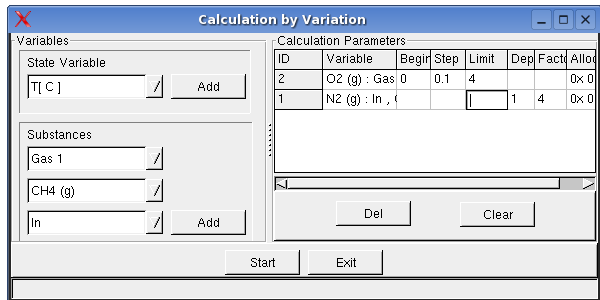
System -> Calculation by Variation shows a dialog box, you can enter initial values of the mass or temperature, pressure as well as volume as variable, so that several calculations will be carried out corresponding to given parameter. This option is especially useful for the tabular and graphical display of calculation results .
System->Activity coefficient: Dialog box to define activity coefficients as functions of concentration
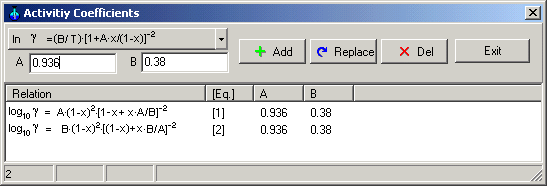
Equations for activity coefficients can be select using drag down button.
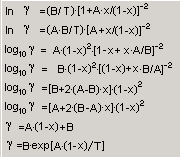
When the Button Add is pressed, the ID of equations ( [1], [2], [3], ...) will be given by the application in the dialog box. When this number is referred to in the f.c.- or a.c.- columns in the windows of a phase, the activity coefficients will be calculated according to the chosen relations
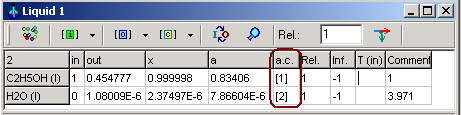
Important rules:
1. when an equation is used for activity coefficient of a
substance, which is depend on the concentration, you should repeat the calculation
at given T, P or V, until the calculated concentration is changed
only
in a negligible range. Because, the application sets as initial
value of the activity coefficient corresponding to the values in
the concentration column (usually x
, mol ratio)
2. You sould always set the
concentration in mol ration x, not weight ratio or weight %.
When you define the activity coefficient by an equation and the
concentration is selected other than mol ratio x, application
shows an error message and breaks the calculation
Monitoring ->
Record
Variables shows a dialog box, in which the record variables can
be selected.
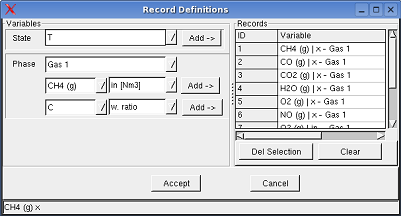
When a variable is selected to record, the entered and/or calculated values of the variables written in an table, when a calculation is executed.
Monitoring -> Record Table shows the record table
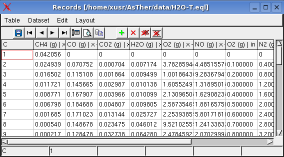
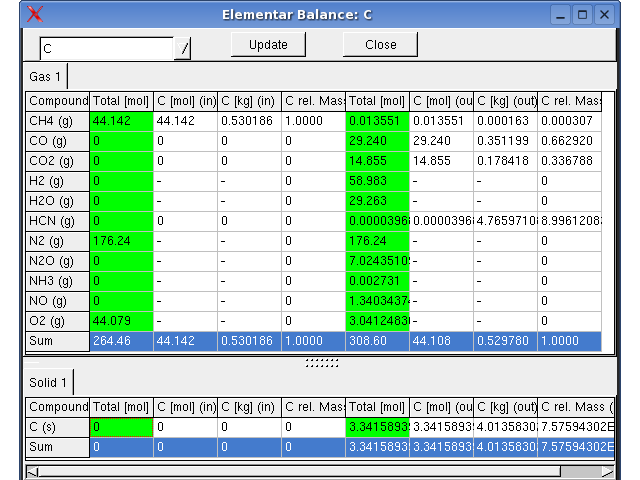
Monitoring -> Elemental Balance, The
distribution of the elements in substances before and after the
equilibrium is
displayed tabular in a window.
The compounds of the phases, the dimensions in the input-, output- and concentration-columns can be set using the toolbar buttons.
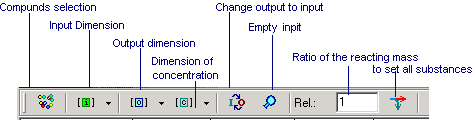
If [mol] is selected as dimension of the input data (default settings), the actual
input values can be given explicitly with another dimension during the
input procedure as for example: 1 kg, 2 lb, 51,6 m3, 7 Nm3. If no
specific dimension is given during input, mol will be taken as
dimension. If other dimensions are selected, any dissimilar given
dimension during input will produce an error message.
4.4. Popup Menus of the Windows for
Phases
When the right mouse button is pressed in a window for phases, a pop
up menu will be shown:
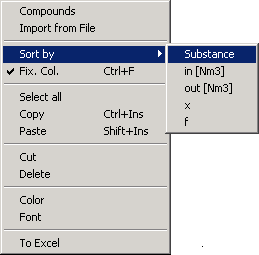
Compounds: a dialog box will be
shown, in which the compounds of the phase can be selected
Sort by: the data will be sorted according to selected criteria
To Excel: transfers the table to an MS Excel Application (MS
Windows only)
4.5. Calculation of a Thermodynamic
Equilibrium
4.5.1. Simple calculation
4.3.1.1. Select the elements in thermodynamic system: menu System -> Elements.
4.3.1.2. Select the compound of the existing phases, Press button comp. in each windows
4.3.1.3. Enter initial mass values in the tables into the in-column of the table in the phase windows. I
4.3.1.4. Start the Calculation: Press Button Calculation
If the
calculation is carried out under constant volume, the selected volume
refers to the equilibrium state after the reaction (out).
The state functions of
the input species will be calculated from the given settings under a
pressure of 1 bar.
The gaseous products will be calculated under the
pressure that results from the reaction.
4.5.2. Phases consisting of pure substances or
mixtures
The application does not make a decision for coexistence of compounds in
the same phase as mixture. When a substance can only exists as a pure substance
in a separately phase, you must set (1) in the a.c.-columns. In
other cases, all substances are regarded as compounds of a mixture
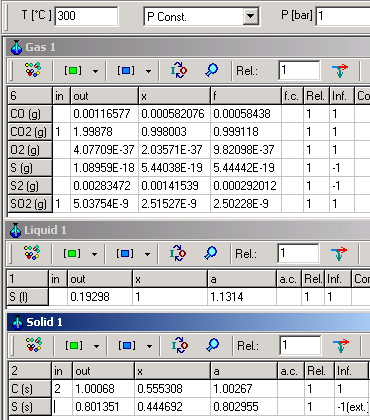
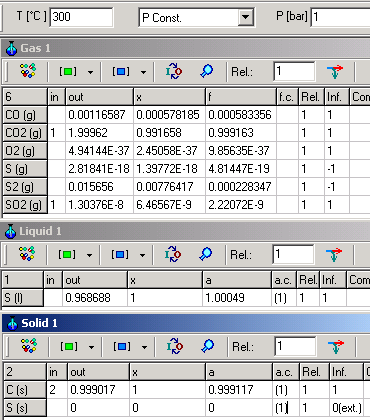
The following example shows for different mixing effects of C(s), S(s) and S(l),
when they are defined as pure substances setting (1) for activity
coefficients.
| C (s) and S (s) are within a mixture |
C(s), S(s) and S(l) are formed as pure substances | |
 |
 |
|
For both cases, following equation is valid:
C (s) + SO2 (g) = S (l) + CO2 (g) K=e-ΔG�/RT=
4.5 . 108
When C(s)
and S(l) are in mixture, K can
be calculated as:
K= aS(l).PCO2/(aC(s).PSO2)=1.1314
. 0.999118/(1.00267 . 2.50228 10-9) =
4.5 . 108
If, however, C(s) and S(l) are pure
substances in separately phases K will be calculated as:
K=
PCO2/PSO2=0.999163/2.22072 10-9
=
4.5 . 108
Although different in result, both calculations are consistently
calculated according to thermodynamic rules.
4.5.3. Results of the Calculation
4.5.3.1. Info-Column
-1: The formation is inhibited
0: The formation is inhibited, the substance can not exists
as pure substance, the substance can exists only in a mixture
1: Formation is possible.
The possibility of the formation of the species are always relative
with respect to the thermodynamic system and its inherent components.
In a systems containing CO2(g), CO(g), H2(g), O2(g) and
C(s) of
O2(g), when there are O2- excess, the formation of C(s) (pure
solid carbon) is inhibited.
Therefore it info-column value will be set to -1 after the calculation.
If, however, the
system also contains CH4(g), the formation of C(s)
possible, In the info-column, the result 1 my be written.
4.5.3.2. All Substances are considered
in mixtures if not otherwise specified
In a system containing FeO(s), Fe(l), Ca(l), CaO(s) at 1200 �C and
1
bar, Fe (l)-mass will have an output value > 0 and the plausibility
value will be 1 as long as there are other liquid components allowing
for mixture. If, however, there should be no Ca(l) (for example)
allowed, the output of Fe(l) will be 0 because no liquid mixture is
possible. Accordingly the plausibility value will be set to 0. In the
first case, you will have to decide, whether a mixture of Fe(l) and
Ca(l) is possible. If you see 0
or -1 in the info-column after the calculation,
when the coexistence Fe(l) and Ca(l) is not possible in a mixture, this
substances should be
deselected from this phase. The program itself takes no decision,
if any mixture is possible or, if the coexistence of the substances in
a mixture is
possible.
4.5.3.3. Selection of compounds
The algorithms of the equilibrium calculations in AsTher differs from other
algorithms. In AsTher, there is no need to include elementary substances for reference reasons. In a system consisting from CH4, CO2, CO, O2, N2
and NO, when O2(g) exists more than enough to the formation of CO2 und H2O, C(s)
and H2(g) have not to be selected in order to create plausible results. This is
no longer necessary in Equilibrium.
4.5.3.4. Graphic Window
The result of the calculation can be recorded in a table. Which
variables are to record, must be defined.
When calculation variables are recorded, the data of
the record table can
be shown in a graphic window.
You can define, which recorded variables
are to show in the graphic window, menu:
Monitoring -> Graphic Variables
Monitoring -> Graphic: shows
the graphic window.
More About Graphic Windows
in Cap.7.
4.6. Some Tips for
the User Interface
A calculation can be break, if no equilibrium can be reached
under the given number of maximum iteration steps and precision.
In this case, the iteration settings have to be altered.
In order to create a better overview, the phase windows
can be
minimised. Those phase windows holding no components can be closed.
The width and height of tables can be changed as shown in the picture below.
4.7. Reliablity of the Calculations
4.7.1. In general, several calculations should be
carried out in different temperatures in the expected range in the real
system. It is very rarely, that in an real system a homogenous
temperature distribution. You should compare the result of
the calculation in the graphic- or table-window.
4.7.2. The given precision value might occasionally have an high influence on the calculation result. Therefore it is advisable to repeat the calculation with another precision and compare the result. If there should be a considerable difference in the results, there might be limiting or faulty preconditions given in the system, which force AsTher to calculate wrong results.
4.8. Errors
and Trouble shooting
4.8.1. If the mass-conservation is
not possible, the calculation will be
terminated. If, for example, a system comprising the elements H and O
in the substances H2(g) and H2O(l), but no Oxygen in the products, the
calculation under 1 bar and 1000 K will stop. To avoid this, it is
recommended to incorporate all potential product substances in the
first step and erase those which will not be created in a second step.
4.8.2. Error messages related
to operations system faults may occur due
to excessively high values of the
free energy of a substance, so that
the processor can not interpret the value. In this case, please check
the thermodynamic data set.
4.8.3. Two reaction
systems with high different quantities may produce erroneous results.
If, for example, a system consisting of Fe, Cl2, FeCl2, H2O,CO,CO2,N2,NO ,
wherein one reaction system is consisting of Fe-Cl2-FeCl2 and the other
consisting of C-CO-H2O-N2-NO.
If the inputs of the calculation is 10000 mol FeCl2, 1 mol H2O and 1 mol N2, 0.1
mol C, and the precision is 0.01,
the calculation result my be incorrect for the system C-CO-H2O-N2-NO.
It is recommended to calculate in separate systems.
4.8.4. Pure Substances
:
If a substance my be exists as a pure substance (and accordingly
the activity coefficient has been set to (1) in the a.c./f.c.- column, please
check after the calculation, whether:
- the info column shows the value 1,
- the amount of that substance is more than 1e-23 mol,
- the calculated value or the activity is nearly 1.
If not, those substances should be excluded from the calculation, e.g.
by setting the a.c.-value to 0.
This can also be done automatically
by AsTher using Menu: System->
Extended Options, in the following dialog box, check the
option auto correction,
which, however, causes longer calculation time.
4.8.5. An Obviously Erroneous Result (e.g. the formation of liquid Fe at 20 �C), although the result are thermodynamically consistent. This may happen, if the extrapolation is enabled and the extrapolated data itself are inconsistent. With the application Pure Substance, you can follow the course of the free Enthalpy in graphic and table window in order to check the validity range of the required dataset.
4.8.6. Erroneous calculation can be caused by the incomplete definition of the system. The system can be influenced by mass of the gaseous substances, although these substance can not take in any reaction. The results of the calculation will be is different in a system consisting of CaO, CaCO3, CO and N2, when the mass of N2 is different, although N2 does not react..
4.8.7. Optimization of
the Iteration
A calculation will be terminated if there is no solution to be found
within the predefined number of iteration steps which would suit the
desired precision.
In this case, please check first, if any message is shown,
When no another error message is shown, the calculation can be
successfully
carried out, if
- the number of iteration steps is increased or
- the required precision (-value) is increased
permitted range and (default) values:
Range of iteration steps: 1 - 2 147 483 647 (43 000)
Range of precision (value): (>0) - 0.1