2.1 General
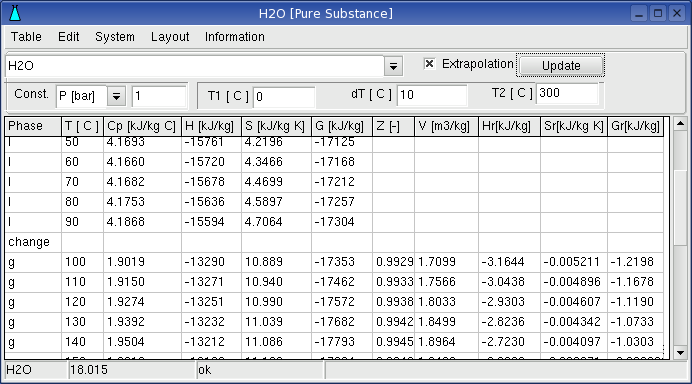
The application Pure Substance shows state functions as table
and graphic for given
temperature and pressure.
Enter the name of the a substance press Button “Update”. The input for
pure substances can include
information on the required aggregate state, e.g. H2O or H2O(g). If no
aggregate state is given, the application searches the database for
that substance, which has the lowest free energy at the given
temperature and pressure. This is always considered within the table.
Test the output given in the table and in the graphical display by 1
bar and between 500 �C and 2500
�C. when Fe and Fe(s) given as substance.
You can select a substance by menu System->Select from Database.
In the window for substance selection, the elements can be specify by
Button
Elements . When the buttons for the elements are pressed, the
colours will be changed to red or blue. The buttons of the selected
elements are shown in red text. When Button Accept is pressed, the
substances are shown in Substance Window, which contains the selected
elements.
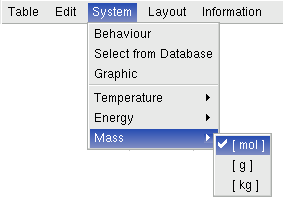
Dimension of the state functions can be selected by Menu
System->Temperature, System->Energy and System -> Mass
2.2. Important Menu Functions
Table:
Table->
save: The settings of the table, like constants, begin, step and
end of the variable parameters. as well as the graphic settings are
saved to a file.
Table->
open: Opens the table settings
System:
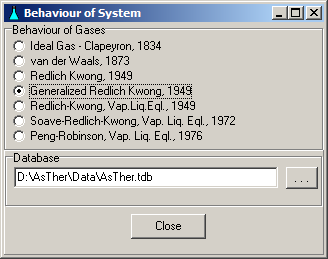
System -> behaviour: You can
select, according to what law the gases should be treated. The state
functions can be calculated according to the law of real gases if the
critical data ( Tc, Pc ) of the gases are known.
System->Select from Database
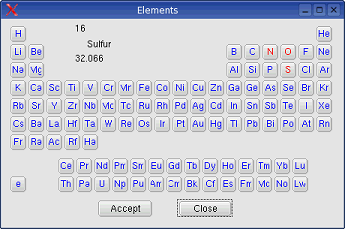
You can select a substance by menu . In the window for substance
selection, the elements can be specify by Button
Elements . When the buttons for the elements are pressed, the
colours will be changed to red or blue. The buttons of the selected
elements are shown in red text. When Button Accept is pressed, the
substances are shown in Substance Window, which contains the selected
elements.
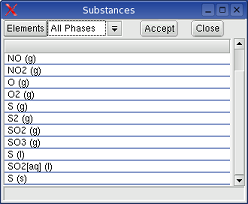
Mouse left double click on an items in Substance Window sets the
substance in the table window.
 |
 |
System->Temperature, System->Energy and System -> Mass
Dimension of the state functions can be selected by Menu
System -> Graphic:
Graphic Window shows the state functions as function of temperature or
pressure.
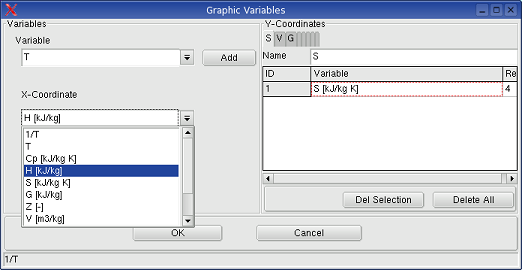
An other graphic variable can be defined by the menu in Graphic Window:
Graphic->User Defined
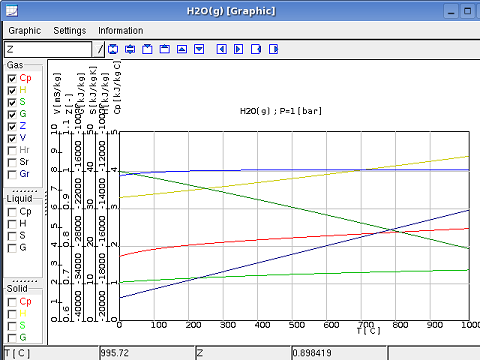
When the menu User Defined is selected, the menu Graphic->Variable definition shows a dialog box. in which the graphic variable can be selected.
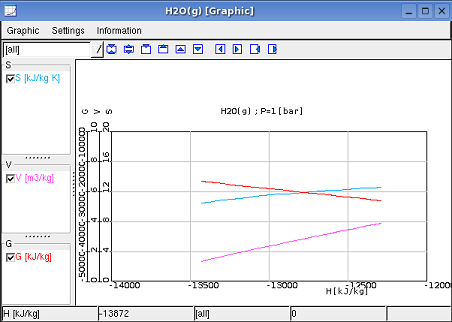
More information for graphic is in 7.Graphic
Information:
Information -> Help:
displays this text.
Information -> Messages:
events or messages are listed in a window.
Information -> About Pure Substance:
Information on software and version
2.3.
Possible Errors and Solutions
2.3.1. If no Information on the
aggregate state is given, Pure Substance will always display the
data of that aggregate state, which has the lowest free energy at
the given temperature and pressure. The results of the calculation are
only valid, if there are data available within the temperature and
pressure range. If there are no data available, you can nevertheless
make a calculation based on extrapolation. When doing so it is
advisable to check the extrapolated values for validity. The safest way
however is the calculated within the limits of existing data and avoid
extrapolation.
2.3.2.If the datasets of a substance contain gaps,
then calculations of the applications Pure Substance and Reaction can be erroneous.
Therefore, datasets of a substances should not contain any gaps.
For example: when two datasets exist for a substance in the database
first from 300-500 K and
second from 600-1000 K.
A calculation between 400 K and 700 K will not consider the second
dataset from 600-1000 K.